
Product
What a pricing decision looks like.
A processor picks up a case of closeout mustard. Somewhere between that case and the shelf, a decision gets made: what does this go out at? In most outlet stores that decision comes from experience, which means it comes from whoever has the most of it.
Outlet Pricer breaks that decision into parts a tool can hold. The product and its reference retail come from a shared database. The discount comes from rules you set once, by category. What is left for the processor is confirming the number and moving to the next item.
Below is each part of that, in the order a processor meets it.
01
Barcode-driven pricing
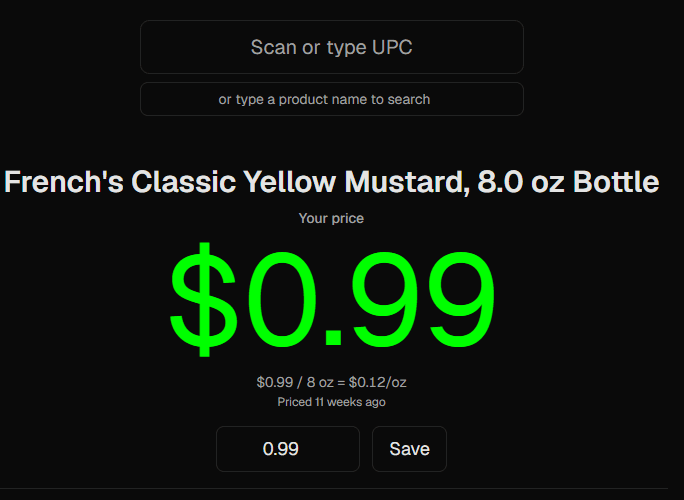
A processor scans the UPC and the product comes up: name, size, category, and the reference retail it is discounted from. When a barcode will not read or the label is torn, the same field takes a product name instead, so nobody has to leave the station to look something up.
The screen is built for speed at a pricing table, not for browsing. Everything needed for one decision is on it at once, and the next scan clears it. A processor working a pallet is doing one motion per item: scan, glance, confirm.
A real scan
Walkthrough video — coming soon
02
Discount rules by category
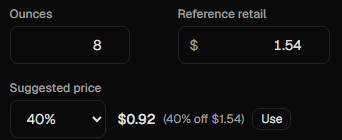
This is where the tribal knowledge goes. You set the policy once, by category: Grocery at 40% off reference retail, Health & Beauty at 30%, whatever your operation actually runs. Every station applies it the same way, on the first shift and the hundredth.
Every product carries a category, and that category’s rule sets the discount. One rule per category is the whole system, which is why it survives contact with a busy truck day: there is no hierarchy to reason about and nothing to resolve in your head.
New operations start from an industry template rather than a blank screen, then change the numbers that do not match how they buy.
How one item resolves
| Scope | Applies to | Discount |
|---|---|---|
| Category | Grocery | 40% |
| Category | Health & Beauty | 30% |
03
Add-on, $49/mo
AI retail research
A discount off reference retail is only as good as the reference retail. Some products arrive without one: a regional brand, a club-pack size, something that has never come through your door before. That is the moment a processor stalls, because the answer is a phone search away and the pallet is not getting shorter.
One click returns a suggested retail price researched from local retailers, along with the source link it came from. A person confirms every result before it is used. Nothing is written to the catalog because a machine proposed it.
Lookups are capped at 50 per day per account, so the add-on costs $49 a month and cannot surprise you with a bill.
The alternative
04
One product database, your pricing stays private
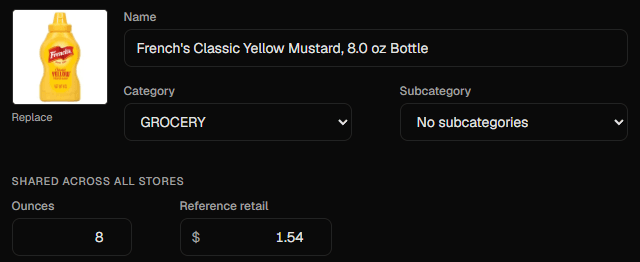
Product facts are shared across every store on the platform: the name, the size, the manufacturer code, the reference retail. That is the part nobody should have to type twice, and it is why a scan returns a filled-in product instead of an empty form.
Prices are not shared between stores. Each price saved in your account sits in your store’s pricing profile, and no other store can see what you charge. The database gets more useful as it grows; what you charge stays between you and your shoppers.
If you already price from a spreadsheet or another tool, we import that profile for you as part of Managed setup, so you start from your numbers rather than someone else’s.
What shared means in practice
05
Multi-terminal, multi-user
Run two stations or nine. Each person has their own account rather than a shared login, so you can see who priced what, and removing access when someone leaves takes one action instead of a password change everybody has to learn.
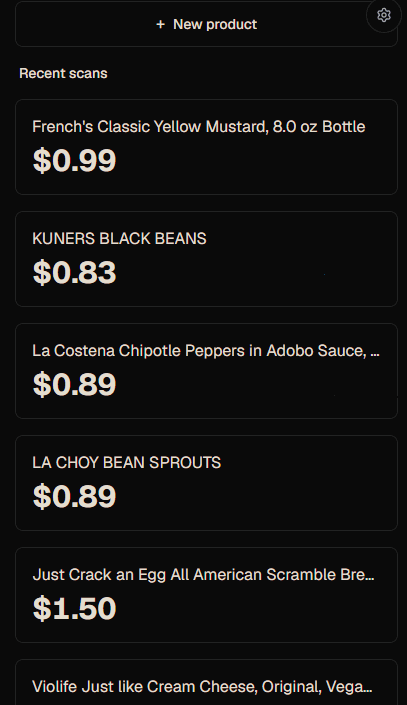
Roles decide reach. Processors price. Managers handle the team and the discount rules. Owners see everything, billing included. A recent-scans feed keeps the floor in sync, so two processors working the same truck are not quietly pricing the same item two different ways.
Two stations, one truck
06
New products, and who checks them
When a processor adds a product nobody has scanned before, it goes in and starts pricing immediately. Nobody stands at a pricing table waiting for an approval. Owners and managers can review what has been added and correct anything that looks wrong.
That speed has a cost worth knowing about: a mistyped size or a misfiled category is a small error on one item and a recurring one across every store that scans it later. An approval queue, which managers will be able to switch on, is on the roadmap for operations that would rather trade a few seconds for that check.
Why the queue earns its keep
07
POS integration
A price decided here has to end up at the register. On the Managed plan we build a connector for your point-of-sale system during onboarding: your inventory and prices come across at implementation, and after that a price saved at the station updates the item in your POS.
No connector is prebuilt. Each one is implementation work scoped against what your particular POS allows.
On the roadmap
Two things worth naming, because they are coming and because they are not here yet.
Barcode database
Broader barcode coverage, so fewer scans come back as a product nobody has entered.
Suggested prices from aggregate data
A suggested price informed by pricing across stores, with individual stores’ prices never visible. It gets more useful as more operations join. Today, you set your own prices and nobody sees them.
Before you ask on a call
What happens with SKUs that have no barcode?
Plenty of outlet inventory arrives without a readable code: a torn label on a dented case, a club-pack with the code buried under shrink, a store-brand item whose code nobody has entered yet. The same field that takes a scan takes a product name, so the processor searches instead of scanning and keeps working.
If nothing matches, they add the product then and there: reference retail, source link, and category. It is usable immediately, so nobody waits on an approval to finish a pallet. An approval queue that managers can switch on is coming.
How do discount rules work in practice?
One rule per category, applied to every product in it. Nothing averages, nothing stacks, and there is no hierarchy to trace when a price looks wrong: you check the category, and you check its rule.
In practice that means you write few rules. Set Grocery at 40% and Health & Beauty at 30%, and those two cover most of what comes through the door. Start from the industry template, then change the categories where your buying differs from the default.
What is the difference between AI retail research and typing it in myself?
The result is the same field with a number in it. The difference is where the number comes from and how long the processor stands still to get it.
Manual entry means opening a browser mid-pallet, deciding which listing counts as comparable, and typing what you find. Research returns a suggested retail with its source link attached, and the processor confirms or rejects it. Nothing is written because the research proposed it, so the check that matters stays with a person.
More on plans and billing in the pricing FAQ.
Price your first product, or walk through your operation with Don.
Self-Service $249/mo. Managed from $599/mo.